#!/usr/bin/env python
# coding: utf-8
# To run this, press "*Runtime*" and press "*Run all*" on a Google Colab A100 instance!
#
#

#

#

Join Discord if you need help + ⭐
Star us on Github ⭐
#
#
# To install Unsloth on your local device, follow [our guide](https://unsloth.ai/docs/get-started/install). This notebook is licensed [LGPL-3.0](https://github.com/unslothai/notebooks?tab=LGPL-3.0-1-ov-file#readme).
#
# You will learn how to do [data prep](#Data), how to [train](#Train), how to [run the model](#Inference), & how to save it
# ### News
# Introducing **Unsloth Studio** - a new open source, no-code web UI to train and run LLMs. [Blog](https://unsloth.ai/docs/new/studio) • [Notebook](https://colab.research.google.com/github/unslothai/unsloth/blob/main/studio/Unsloth_Studio_Colab.ipynb)
#
#
#  Train models — no code needed |
#  Run GGUF models on Mac, Windows & Linux |
#
#
# Train MoEs - DeepSeek, GLM, Qwen and gpt-oss 12x faster with 35% less VRAM. [Blog](https://unsloth.ai/docs/new/faster-moe)
#
# Ultra Long-Context Reinforcement Learning is here with 7x more context windows! [Blog](https://unsloth.ai/docs/new/grpo-long-context)
#
# New in Reinforcement Learning: [FP8 RL](https://unsloth.ai/docs/new/fp8-reinforcement-learning) • [Vision RL](https://unsloth.ai/docs/new/vision-reinforcement-learning-vlm-rl) • [Standby](https://unsloth.ai/docs/basics/memory-efficient-rl) • [gpt-oss RL](https://unsloth.ai/docs/new/gpt-oss-reinforcement-learning)
#
# Visit our docs for all our [model uploads](https://unsloth.ai/docs/get-started/unsloth-model-catalog) and [notebooks](https://unsloth.ai/docs/get-started/unsloth-notebooks).
# # ### Installation
#
# # In[1]:
#
#
# get_ipython().run_cell_magic('capture', '', 'import os, re\nif "COLAB_" not in "".join(os.environ.keys()):\n !pip install unsloth # Do this in local & cloud setups\nelse:\n import torch; v = re.match(r\'[\\d]{1,}\\.[\\d]{1,}\', str(torch.__version__)).group(0)\n xformers = \'xformers==\' + {\'2.10\':\'0.0.34\',\'2.9\':\'0.0.33.post1\',\'2.8\':\'0.0.32.post2\'}.get(v, "0.0.34")\n !pip install sentencepiece protobuf "datasets==4.3.0" "huggingface_hub>=0.34.0" hf_transfer\n !pip install --no-deps unsloth_zoo bitsandbytes accelerate {xformers} peft trl triton unsloth\n!pip install --no-deps transformers==5.5.0\n!pip install torchcodec\nimport torch; torch._dynamo.config.recompile_limit = 64;\n')
#
#
# # In[2]:
#
#
# get_ipython().run_cell_magic('capture', '', '!pip install --no-deps --upgrade timm # For Gemma 4 vision/audio\n')
#
#
# # ### Unsloth
#
# `FastModel` supports loading nearly any model now! This includes Vision and Text models!
# In[3]:
from unsloth import FastModel
import torch
gemma4_models = [
# Gemma-4 instruct models:
"unsloth/gemma-4-E2B-it",
"unsloth/gemma-4-E4B-it",
"unsloth/gemma-4-31B-it",
"unsloth/gemma-4-26B-A4B-it",
# Gemma-4 base models:
"unsloth/gemma-4-E2B",
"unsloth/gemma-4-E4B",
"unsloth/gemma-4-31B",
"unsloth/gemma-4-26B-A4B",
] # More models at https://huggingface.co/unsloth
model, tokenizer = FastModel.from_pretrained(
model_name = "unsloth/gemma-4-26B-A4B-it",
dtype = None, # None for auto detection
max_seq_length = 8192, # Choose any for long context!
load_in_4bit = True, # 4 bit quantization to reduce memory
full_finetuning = False, # [NEW!] We have full finetuning now!
# token = "YOUR_HF_TOKEN", # HF Token for gated models
)
# # Gemma 4 can process Text, Vision and Audio!
#
# Let's first experience how Gemma 4 can handle multimodal inputs. We use Gemma 4's recommended settings of `temperature = 1.0, top_p = 0.95, top_k = 64`
# In[4]:
from transformers import TextStreamer
# Helper function for inference
def do_gemma_4_inference(messages, max_new_tokens = 128):
_ = model.generate(
**tokenizer.apply_chat_template(
messages,
add_generation_prompt = True, # Must add for generation
tokenize = True,
return_dict = True,
return_tensors = "pt",
).to("cuda"),
max_new_tokens = max_new_tokens,
use_cache = True,
temperature = 1.0, top_p = 0.95, top_k = 64,
streamer = TextStreamer(tokenizer, skip_prompt = True),
)
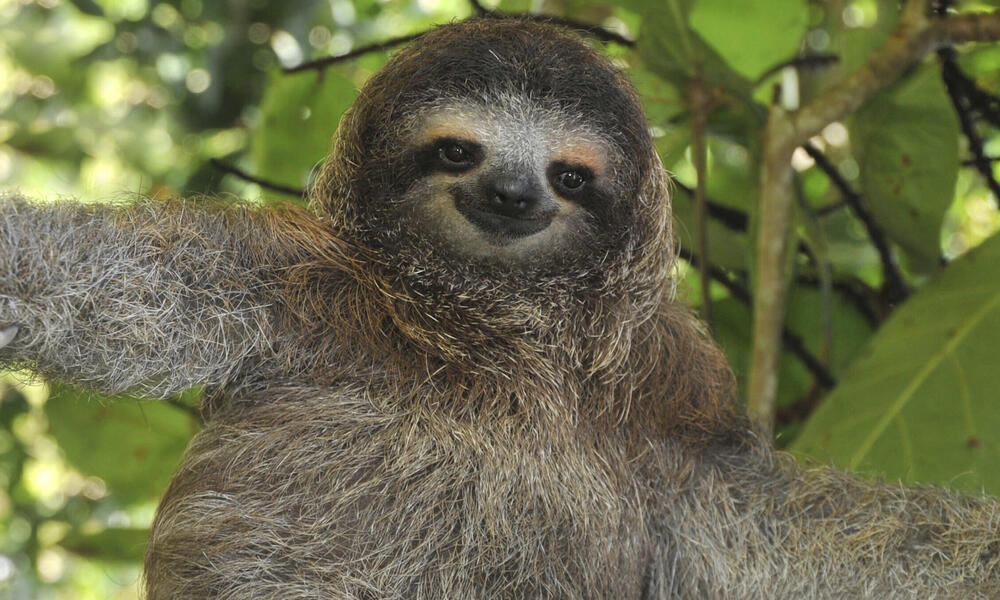
# # Gemma 4 can see images!
#
#
# In[5]:
sloth_link = "https://files.worldwildlife.org/wwfcmsprod/images/Sloth_Sitting_iStock_3_12_2014/story_full_width/8l7pbjmj29_iStock_000011145477Large_mini__1_.jpg"
messages = [{
"role" : "user",
"content": [
{ "type": "image", "image" : sloth_link },
{ "type": "text", "text" : "Which films does this animal feature in?" }
]
}]
# You might have to wait 1 minute for Unsloth's auto compiler
do_gemma_4_inference(messages, max_new_tokens = 256)
# Let's make a poem about sloths!
# In[6]:
messages = [{
"role": "user",
"content": [{ "type" : "text",
"text" : "Write a poem about sloths." }]
}]
do_gemma_4_inference(messages)
# # Let's finetune Gemma 4!
#
# You can finetune the vision and text parts for now through selection - the audio part can also be finetuned - we're working to make it selectable as well!
# We now add LoRA adapters so we only need to update a small amount of parameters!
# In[7]:
model = FastModel.get_peft_model(
model,
finetune_vision_layers = False, # Turn off for just text!
finetune_language_layers = True, # Should leave on!
finetune_attention_modules = True, # Attention good for GRPO
finetune_mlp_modules = True, # Should leave on always!
r = 8, # Larger = higher accuracy, but might overfit
lora_alpha = 8, # Recommended alpha == r at least
lora_dropout = 0,
bias = "none",
random_state = 3407,
)
#
# ### Data Prep
# We now use the `Gemma-4` format for conversation style finetunes. We use [Maxime Labonne's FineTome-100k](https://huggingface.co/datasets/mlabonne/FineTome-100k) dataset in ShareGPT style. Gemma-4 renders multi turn conversations like below:
#
# ```
# <|turn>user
# Hello
# <|turn>model
# Hey there!
# ```
# We use our `get_chat_template` function to get the correct chat template. We support `zephyr, chatml, mistral, llama, alpaca, vicuna, vicuna_old, phi3, llama3, phi4, qwen2.5, gemma3, gemma-4` and more.
# In[8]:
from unsloth.chat_templates import get_chat_template
tokenizer = get_chat_template(
tokenizer,
chat_template = "gemma-4-thinking",
)
# We get the first 3000 rows of the dataset
# In[9]:
from datasets import load_dataset
dataset = load_dataset("mlabonne/FineTome-100k", split = "train[:3000]")
# We now use `standardize_data_formats` to try converting datasets to the correct format for finetuning purposes!
# In[10]:
from unsloth.chat_templates import standardize_data_formats
dataset = standardize_data_formats(dataset)
# Let's see how row 100 looks like!
# In[11]:
dataset[100]
# We now have to apply the chat template for `Gemma-3` onto the conversations, and save it to `text`. We remove the `` token using removeprefix(`''`) since we're finetuning. The Processor will add this token before training and the model expects only one.
# In[12]:
def formatting_prompts_func(examples):
convos = examples["conversations"]
texts = [tokenizer.apply_chat_template(convo, tokenize = False, add_generation_prompt = False).removeprefix('') for convo in convos]
return { "text" : texts, }
dataset = dataset.map(formatting_prompts_func, batched = True)
# Let's see how the chat template did! Notice there is no `` token as the processor tokenizer will be adding one.
# In[13]:
dataset[100]["text"]
#
# ### Train the model
# Now let's train our model. We do 60 steps to speed things up, but you can set `num_train_epochs=1` for a full run, and turn off `max_steps=None`.
# In[14]:
from trl import SFTTrainer, SFTConfig
trainer = SFTTrainer(
model = model,
tokenizer = tokenizer,
train_dataset = dataset,
eval_dataset = None, # Can set up evaluation!
args = SFTConfig(
dataset_text_field = "text",
per_device_train_batch_size = 1,
gradient_accumulation_steps = 4, # Use GA to mimic batch size!
warmup_steps = 5,
# num_train_epochs = 1, # Set this for 1 full training run.
max_steps = 60,
learning_rate = 2e-4, # Reduce to 2e-5 for long training runs
logging_steps = 1,
optim = "adamw_8bit",
weight_decay = 0.001,
lr_scheduler_type = "linear",
seed = 3407,
report_to = "none", # Use TrackIO/WandB etc
),
)
# We also use Unsloth's `train_on_completions` method to only train on the assistant outputs and ignore the loss on the user's inputs. This helps increase accuracy of finetunes!
# In[15]:
from unsloth.chat_templates import train_on_responses_only
trainer = train_on_responses_only(
trainer,
instruction_part = "<|turn>user\n",
response_part = "<|turn>model\n",
)
# Let's verify masking the instruction part is done! Let's print the 100th row again. Notice how the sample only has a single `` as expected!
# In[16]:
tokenizer.decode(trainer.train_dataset[100]["input_ids"])
# Now let's print the masked out example - you should see only the answer is present:
# In[17]:
tokenizer.decode([tokenizer.pad_token_id if x == -100 else x for x in trainer.train_dataset[100]["labels"]]).replace(tokenizer.pad_token, " ")
# In[18]:
# @title Show current memory stats
gpu_stats = torch.cuda.get_device_properties(0)
start_gpu_memory = round(torch.cuda.max_memory_reserved() / 1024 / 1024 / 1024, 3)
max_memory = round(gpu_stats.total_memory / 1024 / 1024 / 1024, 3)
print(f"GPU = {gpu_stats.name}. Max memory = {max_memory} GB.")
print(f"{start_gpu_memory} GB of memory reserved.")
# # Let's train the model!
#
# To resume a training run, set `trainer.train(resume_from_checkpoint = True)`
# In[19]:
trainer_stats = trainer.train()
# In[20]:
# @title Show final memory and time stats
used_memory = round(torch.cuda.max_memory_reserved() / 1024 / 1024 / 1024, 3)
used_memory_for_lora = round(used_memory - start_gpu_memory, 3)
used_percentage = round(used_memory / max_memory * 100, 3)
lora_percentage = round(used_memory_for_lora / max_memory * 100, 3)
print(f"{trainer_stats.metrics['train_runtime']} seconds used for training.")
print(
f"{round(trainer_stats.metrics['train_runtime']/60, 2)} minutes used for training."
)
print(f"Peak reserved memory = {used_memory} GB.")
print(f"Peak reserved memory for training = {used_memory_for_lora} GB.")
print(f"Peak reserved memory % of max memory = {used_percentage} %.")
print(f"Peak reserved memory for training % of max memory = {lora_percentage} %.")
#
# ### Inference
# Let's run the model via Unsloth native inference! According to the `Gemma-3` team, the recommended settings for inference are `temperature = 1.0, top_p = 0.95, top_k = 64`
# In[21]:
from unsloth.chat_templates import get_chat_template
tokenizer = get_chat_template(
tokenizer,
chat_template = "gemma-4-thinking",
)
messages = [{
"role": "user",
"content": [{
"type" : "text",
"text" : "Continue the sequence: 1, 1, 2, 3, 5, 8,",
}]
}]
inputs = tokenizer.apply_chat_template(
messages,
add_generation_prompt = True, # Must add for generation
return_tensors = "pt",
tokenize = True,
return_dict = True,
).to("cuda")
outputs = model.generate(
**inputs,
max_new_tokens = 64, # Increase for longer outputs!
use_cache = True,
# Recommended Gemma-3 settings!
temperature = 1.0, top_p = 0.95, top_k = 64,
)
tokenizer.batch_decode(outputs)
# You can also use a `TextStreamer` for continuous inference - so you can see the generation token by token, instead of waiting the whole time!
# In[22]:
messages = [{
"role": "user",
"content": [{"type" : "text", "text" : "Why is the sky blue?",}]
}]
inputs = tokenizer.apply_chat_template(
messages,
add_generation_prompt = True, # Must add for generation
return_tensors = "pt",
tokenize = True,
return_dict = True,
).to("cuda")
from transformers import TextStreamer
_ = model.generate(
**inputs,
max_new_tokens = 64, # Increase for longer outputs!
use_cache = True,
# Recommended Gemma-3 settings!
temperature = 1.0, top_p = 0.95, top_k = 64,
streamer = TextStreamer(tokenizer, skip_prompt = True),
)
#
# ### Saving, loading finetuned models
# To save the final model as LoRA adapters, either use Hugging Face's `push_to_hub` for an online save or `save_pretrained` for a local save.
#
# **[NOTE]** This ONLY saves the LoRA adapters, and not the full model. To save to 16bit or GGUF, scroll down!
# In[23]:
model.save_pretrained("gemma_4_lora") # Local saving
tokenizer.save_pretrained("gemma_4_lora")
# model.push_to_hub("HF_ACCOUNT/gemma_4_lora", token = "YOUR_HF_TOKEN") # Online saving
# tokenizer.push_to_hub("HF_ACCOUNT/gemma_4_lora", token = "YOUR_HF_TOKEN") # Online saving
# Now if you want to load the LoRA adapters we just saved for inference, set `False` to `True`:
# In[24]:
if False:
from unsloth import FastModel
model, tokenizer = FastModel.from_pretrained(
model_name = "gemma_4_lora", # YOUR MODEL YOU USED FOR TRAINING
max_seq_length = 2048,
load_in_4bit = True,
)
messages = [{
"role": "user",
"content": [{"type" : "text", "text" : "What is Gemma-4?",}]
}]
inputs = tokenizer.apply_chat_template(
messages,
add_generation_prompt = True, # Must add for generation
return_tensors = "pt",
tokenize = True,
return_dict = True,
).to("cuda")
from transformers import TextStreamer
_ = model.generate(
**inputs,
max_new_tokens = 128, # Increase for longer outputs!
# Recommended Gemma-3 settings!
temperature = 1.0, top_p = 0.95, top_k = 64,
streamer = TextStreamer(tokenizer, skip_prompt = True),
)
# ### Saving to float16 for VLLM
#
# We also support saving to `float16` directly for deployment! We save it in the folder `gemma-4-finetune`. Set `if False` to `if True` to let it run!
# In[25]:
if False: # Change to True to save finetune!
model.save_pretrained_merged("gemma-4-finetune", tokenizer)
# If you want to upload / push to your Hugging Face account, set `if False` to `if True` and add your Hugging Face token and upload location!
# In[26]:
if False: # Change to True to upload finetune
model.push_to_hub_merged(
"HF_ACCOUNT/gemma-4-finetune", tokenizer,
token = "YOUR_HF_TOKEN"
)
# ### GGUF / llama.cpp Conversion
# To save to `GGUF` / `llama.cpp`, we support it natively now for all models! For now, you can convert easily to `Q8_0, F16 or BF16` precision. `Q4_K_M` for 4bit will come later!
# In[27]:
if False: # Change to True to save to GGUF
model.save_pretrained_gguf(
"gemma_4_finetune",
tokenizer,
quantization_method = "Q8_0", # For now only Q8_0, BF16, F16 supported
)
# Likewise, if you want to instead push to GGUF to your Hugging Face account, set `if False` to `if True` and add your Hugging Face token and upload location!
# In[28]:
if False: # Change to True to upload GGUF
model.push_to_hub_gguf(
"HF_ACCOUNT/gemma_4_finetune",
tokenizer,
quantization_method = "Q8_0", # Only Q8_0, BF16, F16 supported
token = "YOUR_HF_TOKEN",
)
# Now, use the `gemma-4-finetune.gguf` file or `gemma-4-finetune-Q4_K_M.gguf` file in llama.cpp.
#
# And we're done! If you have any questions on Unsloth, we have a [Discord](https://discord.gg/unsloth) channel! If you find any bugs or want to keep updated with the latest LLM stuff, or need help, join projects etc, feel free to join our Discord!
#
# Some other resources:
# 1. Train your own reasoning model - Llama GRPO notebook [Free Colab](https://colab.research.google.com/github/unslothai/notebooks/blob/main/nb/Llama3.1_(8B)-GRPO.ipynb)
# 2. Saving finetunes to Ollama. [Free notebook](https://colab.research.google.com/github/unslothai/notebooks/blob/main/nb/Llama3_(8B)-Ollama.ipynb)
# 3. Llama 3.2 Vision finetuning - Radiography use case. [Free Colab](https://colab.research.google.com/github/unslothai/notebooks/blob/main/nb/Llama3.2_(11B)-Vision.ipynb)
# 4. See notebooks for DPO, ORPO, Continued pretraining, conversational finetuning and more on our [documentation](https://unsloth.ai/docs/get-started/unsloth-notebooks)!
#
#
#

#

#

#
# Join Discord if you need help + ⭐️
Star us on Github ⭐️
#
#
# This notebook and all Unsloth notebooks are licensed [LGPL-3.0](https://github.com/unslothai/notebooks?tab=LGPL-3.0-1-ov-file#readme).